

People think AI has arrived, so now anything can be automated.
I understand why.
Every day you see a new video:
“Automate your emails.”
“Automate your follow-ups.”
“Automate your sales.”
“Build an AI agent that runs your business.”
And then you try it.
You open Zapier, Make (Integromat), n8n, Activepieces, or any other flow builder.
You connect a few apps.
You add an “AI step.”
You press Run.
For a moment, it feels like magic.
And then… it breaks.
It replies to the wrong email.
It sends a wrong message to a customer.
It fails silently.
Or worse: it works incorrectly and you don’t notice until damage is done.
Then you conclude:
“Automation doesn’t work.”
“AI is not reliable.”
“Maybe this is only for big companies.”
No.
The problem isn’t AI.
The problem is the way most people approach automation.
The uncomfortable truth
Automation is not a shortcut. Automation is a mirror.
If your process is unclear, automation will magnify the confusion.
If your team improvises, automation will amplify the chaos.
If the flow exists only in your head, the automation will collapse under real-world edge cases.
Here’s the sentence I wish someone told me years ago:
Don’t automate what you’ve never done manually.
Automate only what you understand deeply — because automation needs decisions, not just actions.
AI can generate content, summarize, classify, respond, and route.
But it cannot magically create a stable process where none exists.
Why “AI automation” fails for most people
Let me give you a simple example.
A person says:
“From tomorrow, I’ll automate Gmail.”
So they build an automation:
- Trigger: “New email arrives”
- Step: “AI reads it”
- Step: “AI drafts reply”
- Step: “Send reply automatically”
Sounds efficient.
In reality, what happens?
- The AI replies confidently to an email that required a human decision
- It replies with the wrong tone
- It replies when it should have asked questions
- It replies to a legal/financial/medical email where sending anything is risky
- It replies to spam or an angry customer — and escalates the problem
And then the person shuts the automation down.
Not because automation is bad.
Because the “rules of the system” were never defined.
No SOP.
No decision tree.
No escalation rules.
No exceptions.
No boundaries.
The real model: Automation is 20% building, 80% defining
Most people treat automation like wiring apps together.
Experienced operators treat automation like designing a system:
- What is the goal?
- What is the input?
- What decisions need to happen?
- What can be automated safely?
- What must be reviewed by a human?
- What happens when something unexpected occurs?
- What does “success” look like?
- What does “failure” look like?
- How will we monitor and improve this?
That’s the difference.
AI gives you leverage — but only if your thinking is clear.
The Rigomo Method: A step-by-step system to build automation that doesn’t collapse
I’ve been building automations for years — long before the current AI hype wave.
At Rigomo, automation isn’t an “extra feature.” It’s the foundation.
We automated:
- lead capture → follow-up → payment nudges
- onboarding flows
- support workflows
- content distribution
- reactivation of cold leads
- internal operations
And here’s an important detail:
Systems handle what systems should handle. Humans handle what humans should handle.
Over time, these automations have saved us hundreds of hours — not in theory, in reality.
So if you want automation that actually gives you productivity, follow this process.
Step 1: Pick the right process (the “Daily Practice Rule”)
Here’s the first filter:
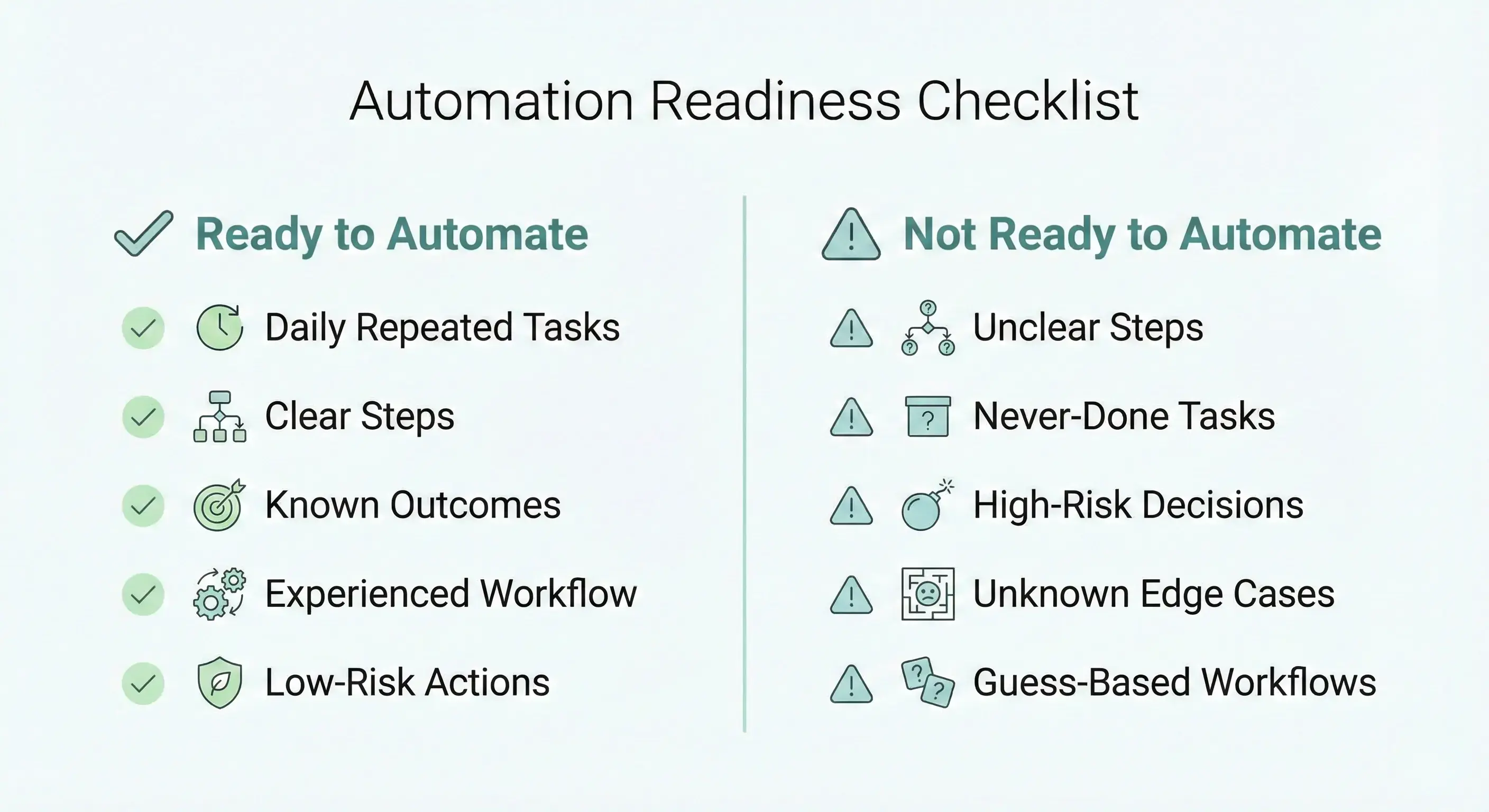
✅ Automate tasks you (or your team) do every day
✅ Tasks you understand from end-to-end
✅ Tasks where mistakes are predictable
✅ Tasks where inputs/outputs are clear
❌ Don’t automate tasks you’ve never executed yourself
❌ Don’t automate tasks you don’t understand deeply
❌ Don’t automate “dream workflows” you saw in a video
❌ Don’t automate high-risk steps without guardrails
If you have never done the work manually, you can’t define the exceptions.
If you can’t define the exceptions, automation will fail.
Start with what you already do.
Step 2: Write the SOP before you touch any tool
This is where most people skip — and this is why they suffer.
An SOP (Standard Operating Procedure) is not fancy documentation.
It’s simply:
“If X happens, we do Y, then Z, and if A happens, we do B.”
Even if you’re a solo founder, you still need SOPs — because automation is like hiring a robot intern. If you don’t give instructions, it will improvise. Improvisation is where things break.
Your SOP must include:
1) The objective
What are we trying to achieve?
Example:
“Reply to inbound emails only when they are basic queries. Everything else should be escalated.”
2) Inputs
Where does the task start?
Example:
New Gmail email, new WhatsApp message, new form lead, new order paid, etc.
3) Steps
The exact steps (not vague).
4) Decision points
This is the heart.
- If email contains pricing request → send pricing template
- If email contains complaint → escalate to human
- If email is invoice-related → route to finance
- If email is from unknown domain with attachments → do not respond automatically
5) Exceptions & failures
What if:
- API fails?
- AI returns nonsense?
- Duplicate trigger happens?
- Customer replies angry?
- Payment status mismatches?
- Webhook arrives twice?
6) Ownership
Who is responsible when automation fails?
Even if the answer is “me”, write it.

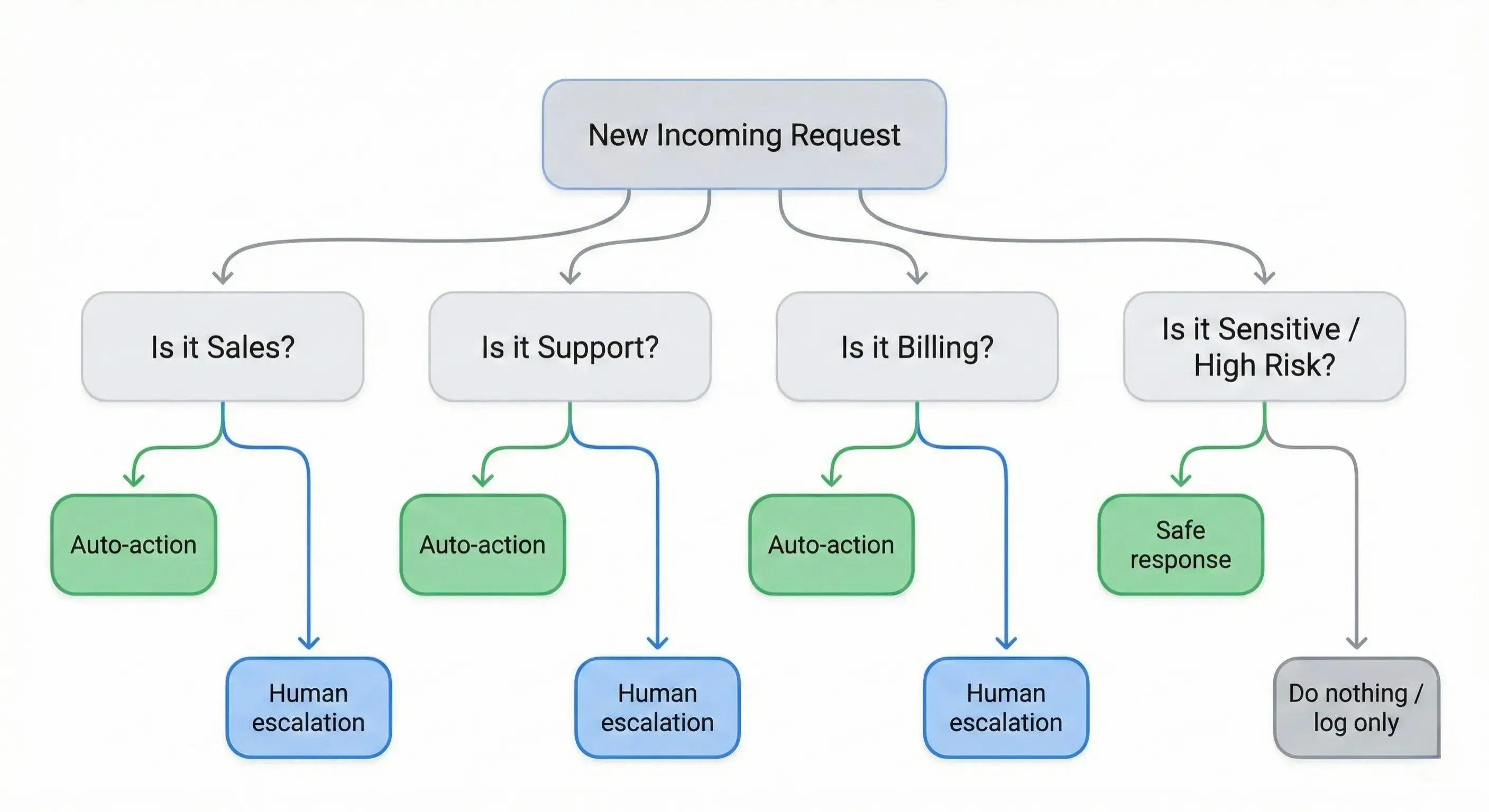
Step 3: Convert SOP into a decision tree (so AI doesn’t guess)
AI is powerful, but it loves guessing.
If you want reliability, you must convert your SOP into a decision tree.
A decision tree forces clarity:
- What category is this input?
- What is the risk level?
- What action is allowed?
- What action is forbidden?
- When should it escalate?
This is where beginner automations become expert systems.
Rule of thumb:
If you can’t draw it as a decision tree, you’re not ready to automate it.
Step 4: Decide the automation boundaries (what AI can do vs what humans must do)
This one decision saves businesses.
Don’t ask: “Can AI do it?”
Ask: “Should AI do it?”
Use a boundary model:
Level 1 — AI Suggests (Safest)
AI drafts, human approves.
Best for:
- important emails
- sensitive conversations
- legal/medical/financial contexts
- brand voice risk
Level 2 — AI Acts with Guardrails (Good for scale)
AI takes action only for low-risk categories, with strict templates.
Best for:
- FAQs
- routing tickets
- tagging leads
- sending resources
- basic confirmations
Level 3 — Fully Automated (Only for stable processes)
No human touch, but strong monitoring.
Best for:
- internal notifications
- tagging systems
- moving records between systems
- lead assignment rules
- scheduled reporting
Most people jump straight to Level 3.
That’s why they get hurt.
Step 5: Build the automation only after the SOP is written
Now you choose tools like:
- Zapier / Make
- n8n / Activepieces
- custom code (PHP, Python, Node, etc.)
- agent frameworks
But the truth is:
tools don’t fix unclear thinking.
When you have SOP + decision tree, building becomes easy.
You’re not “experimenting.”
You’re implementing known rules.
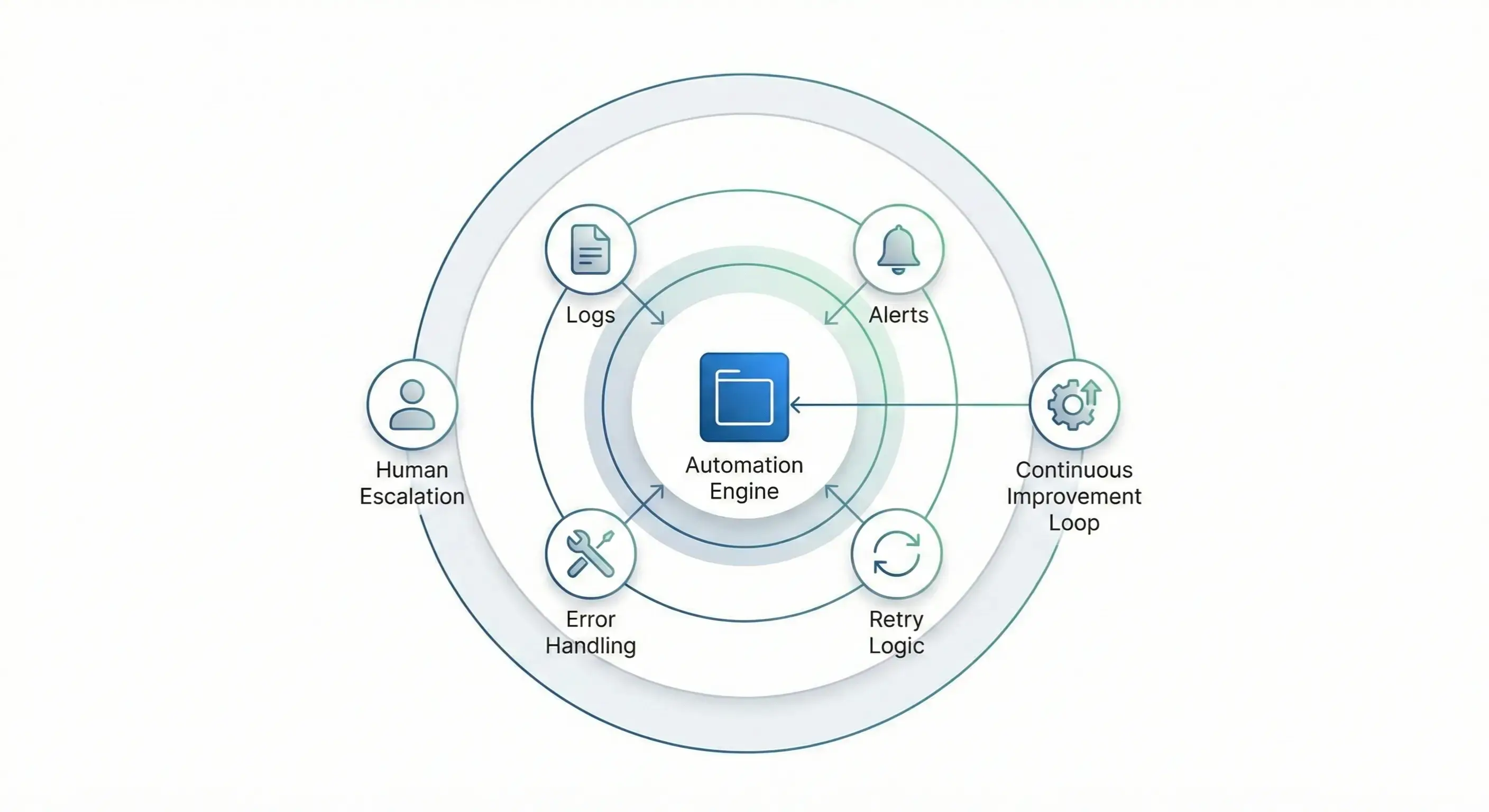
Step 6: Add “failure design” (because failures are guaranteed)
Every automation fails. The question is:
Does it fail safely or dangerously?
Add these patterns:
1) Logging
Every run must log:
- input summary
- decisions made
- output
- errors
2) Alerts
If failure occurs:
- send alert to WhatsApp / email
- create a ticket
- stop the automation if needed
3) Retry rules
Some failures should retry. Some should not.
4) Idempotency / duplicate protection
Webhooks often come twice. Your system must handle it.
5) Rollback path
What happens if wrong message was sent?
What happens if wrong lead was marked paid?
What happens if duplicate invoice was generated?
Most people ignore this part until they suffer.
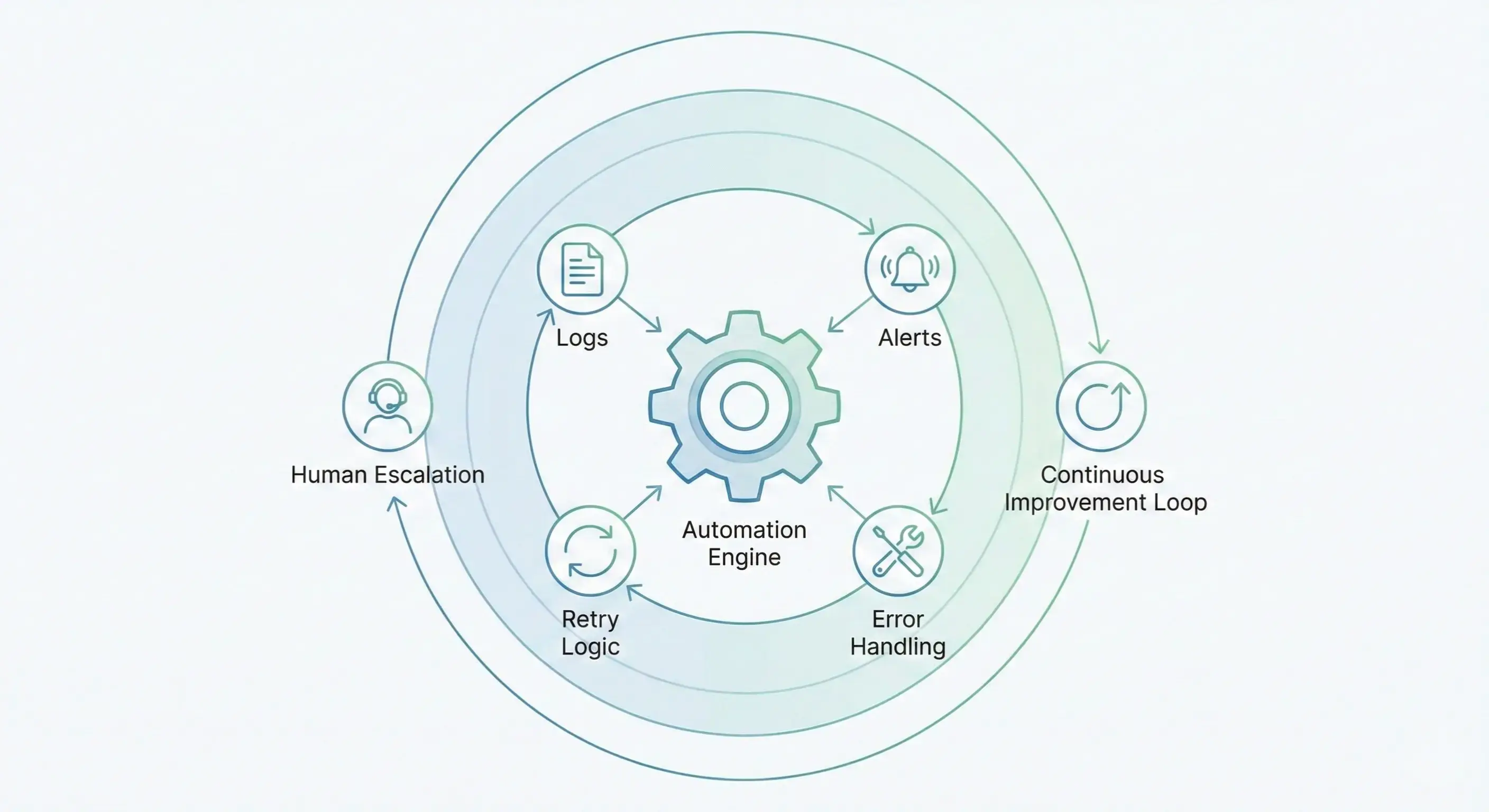
Step 7: Monitor runs and improve the SOP (this is where real productivity comes from)
This is the part people don’t want to do — and this is the part that creates compounding ROI.
Automation is not “build once and forget.”
Automation is:
- build
- observe
- learn
- refine SOP
- adjust rules
- improve prompts/templates
- remove unstable steps
- rebuild stronger
Every failure is not a reason to quit.
It’s a signal that your SOP needs refinement.
This is exactly how our automations matured inside Rigomo.
Step 8: Scale only after stability (don’t automate everything at once)
People see 20 processes and try to automate 20 processes.
That’s a trap.
Instead:
- automate 1 process
- stabilize it
- document it
- then automate the next
If you build 20 unstable automations, you’ll spend your life debugging — and you’ll hate automation.
Practical Examples (how you can apply this tomorrow)
Example A: Sales Follow-up Automation
Wrong approach:
“AI will follow up with every lead automatically.”
Right approach:
- SOP defines lead categories
- AI drafts follow-ups only for cold leads
- High-intent leads escalate to human call or a predefined flow
- If lead is not interested → send value content instead of pushing sales
- Every message is tracked, logged, and improved
Example B: Support Automation
Wrong approach:
“AI will handle support.”
Right approach:
- AI handles FAQs + routes issues
- If issue is billing or refund → escalate
- If issue has angry sentiment → escalate
- If user is stuck → send guided steps + collect needed info
- Every support loop updates the knowledge base
This is how support automation becomes reliable.
The mindset shift you need
If you remember only one thing from this article, remember this:
Automation doesn’t replace work. It replaces repeated work that you understand.
AI doesn’t replace intelligence. It multiplies structured intelligence.
If you want automation to save you hundreds of hours, you must first do the hard part:
- define the process
- document it
- design boundaries
- plan failures
- monitor and improve
That’s it.
Not sexy.
But extremely powerful.
A simple checklist before you automate anything
Use this checklist before building any automation:
✅ Have we done this manually repeatedly?
✅ Do we know the full flow from start to finish?
✅ Is there an SOP written in simple steps?
✅ Is there a decision tree for exceptions?
✅ Are boundaries defined (AI suggests vs AI acts)?
✅ Are failure paths designed (logs, alerts, retries)?
✅ Do we have monitoring and review time weekly?
If “no” to any — don’t automate yet. Fix the foundation first.

Leave a comment
Your email address will not be published. Required fields are marked *